DV360 Complete Guide: What It Is, How It Works and How to Use It
Never used DV360 before? This complete DV360 guide for beginners, how it works, what every section does and how to run your first programmatic campaign — in plain English with real examples.
What is DV360? — The Simple Explanation
Imagine you want to show your brand’s ad to cricket fans across India — on news websites, apps, YouTube, Smart TVs and streaming platforms — all at the same time.
Doing this manually would take weeks. You would need to contact each website individually, negotiate prices, sign contracts, send creatives and track results separately for each one.
DV360 does all of this automatically — in one place.
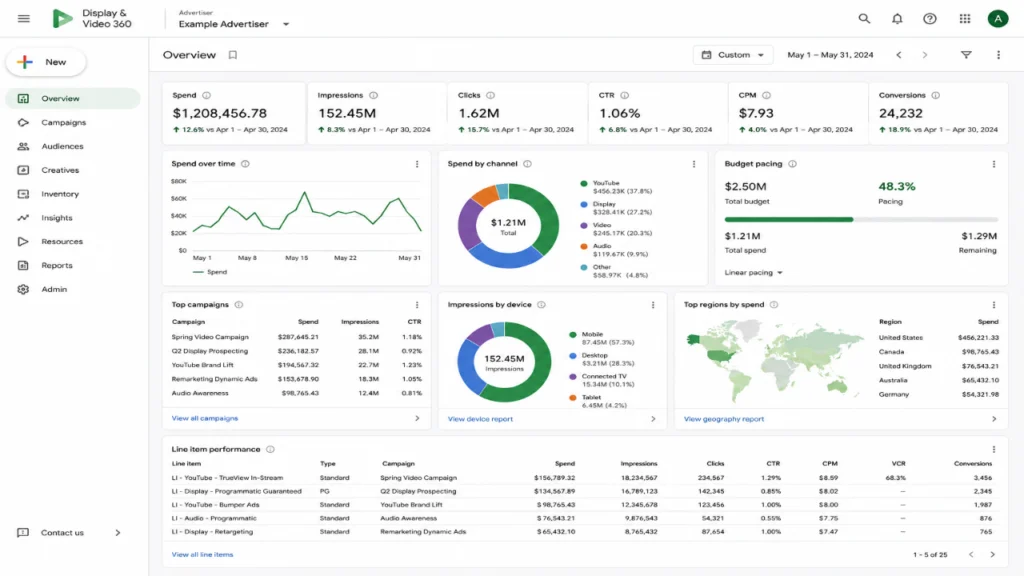
DV360 stands for Display & Video 360. It is Google’s enterprise-level programmatic advertising platform — a tool that lets advertisers and agencies buy digital ad space across thousands of websites, apps and streaming platforms simultaneously, using data and automation to find the right audience at the right price.
Think of DV360 as a command centre for digital advertising. You sit in one place, set your targets, upload your creative and DV360 goes out and buys ad space across the entire internet on your behalf — in real time, millisecond by millisecond.
Who Uses DV360?
DV360 is used by:
- Media agencies — GroupM, Publicis, Madison, Initiative — who run campaigns on behalf of brands
- Brand marketing teams — companies that manage their own programmatic buying in-house
- Ad ops specialists — people like you who troubleshoot and optimise campaigns daily
- Trading desks — specialist programmatic buying teams within large agencies
It is not a tool for small businesses or beginners running Facebook ads. DV360 is an enterprise platform — typically used for campaigns with budgets starting from ₹10-20 lakhs and above.
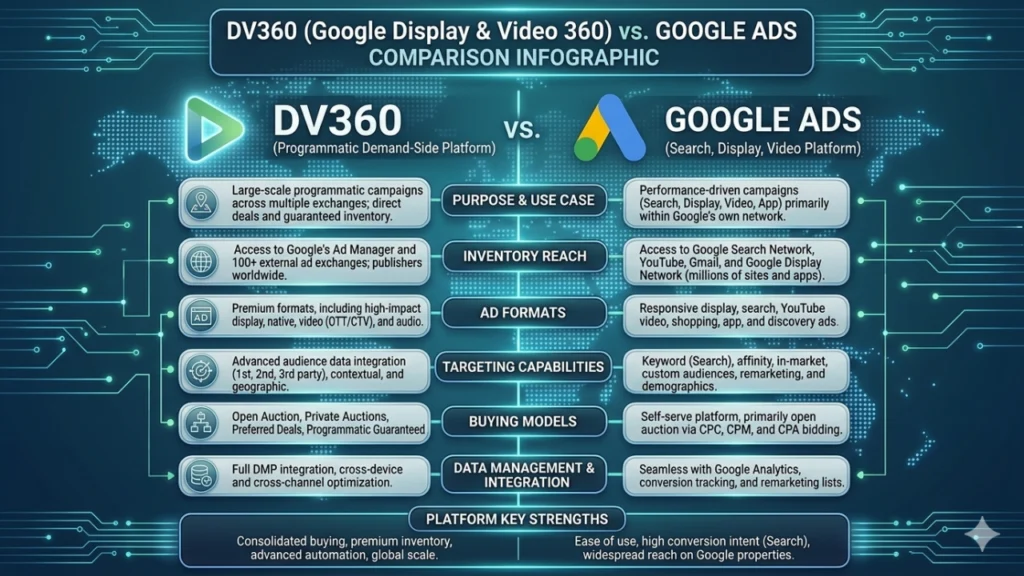
DV360 vs Google Ads — What’s the Difference?
This is the most common question from beginners. Both are Google products. Both run ads. So what is the difference?
| Google Ads | DV360 | |
|---|---|---|
| Best for | Search, small business, simple campaigns | Large-scale programmatic, brand campaigns |
| Inventory | Google’s own inventory (Search, YouTube, GDN) | Google + thousands of external publishers via exchanges |
| Targeting | Basic demographic and keyword | Advanced audience, data-driven, custom segments |
| Minimum budget | Any budget | Typically ₹10L+ |
| Who uses it | Small businesses, performance marketers | Agencies, enterprise brands, trading desks |
| Complexity | Simple | Complex — needs training |
| Access | Self-serve at ads.google.com | Requires Google approval and partner access |
The simple way to remember it: Google Ads is the corner shop. DV360 is the wholesale warehouse.
How DV360 Fits in the Programmatic Ecosystem
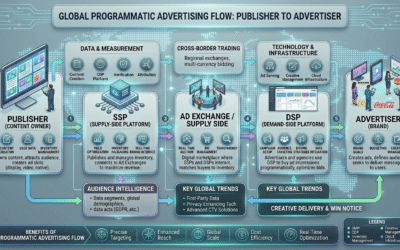
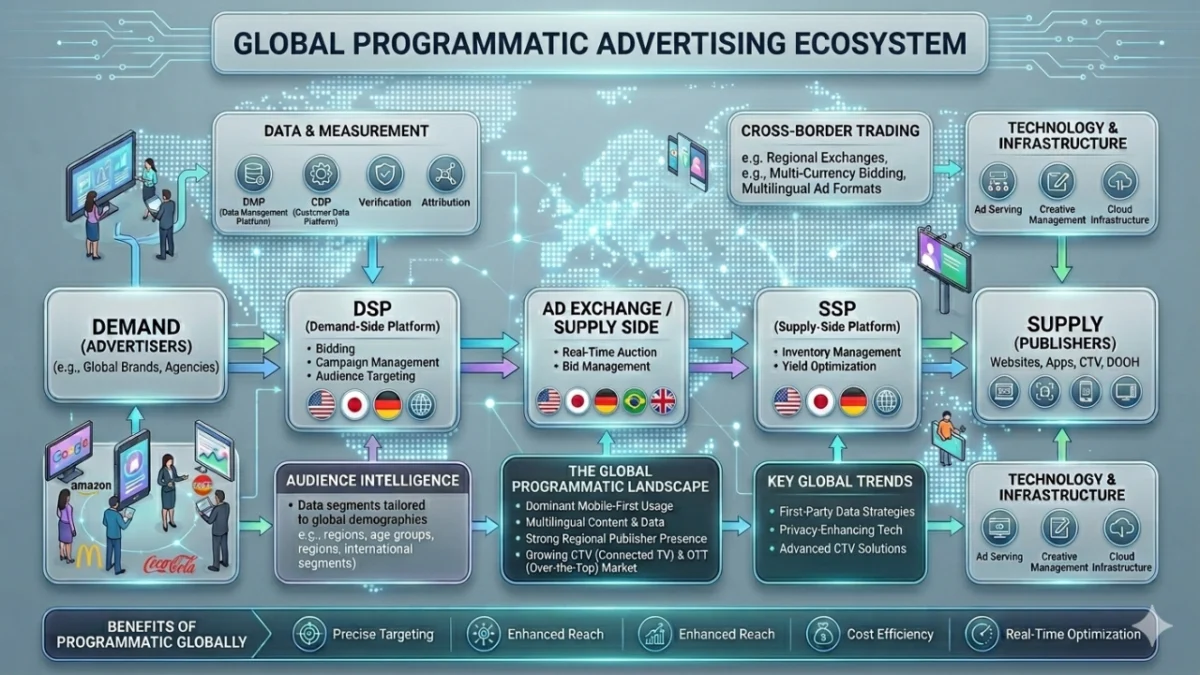
DV360 is a DSP — Demand Side Platform. This means it sits on the buying side of programmatic advertising.
Here is how it connects to everything else:
You (Advertiser) → DV360 (DSP) → Ad Exchange → SSP → Publisher → User
When you set up a campaign in DV360:
- DV360 sends bid requests to multiple ad exchanges (Google AdX, Index Exchange, PubMatic etc)
- The exchanges run real-time auctions
- DV360 wins impressions that match your targeting at the right price
- Your ad is instantly served to the user
- Everything is tracked and reported back in DV360
All of this happens in under 100 milliseconds — every single time someone loads a web page or opens an app.
The 5 Main Parts of DV360
DV360 is part of the Google Marketing Platform (GMP). It connects with other Google tools:
Campaign Manager 360 (CM360) — The ad server that tracks everything DV360 — The DSP that buys the media Google Analytics 4 (GA4) — Website analytics and audience data Search Ads 360 (SA360) — Search campaign management Looker Studio — Reporting and dashboards
For most campaigns, you will primarily work in DV360 for buying and CM360 for tracking and creative management.
Understanding the DV360 Campaign Structure
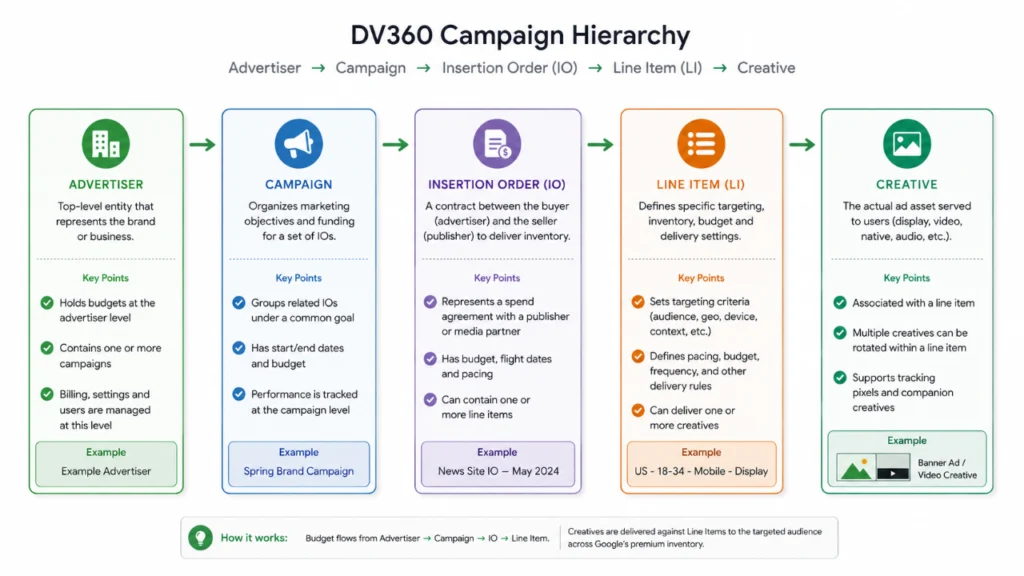
This is where most beginners get confused. DV360 has a specific hierarchy for organising campaigns. Understanding this hierarchy is essential before you touch anything.
Level 1 — Advertiser
The top level. This is the brand or company running the campaign. Everything sits under the Advertiser level.
Example: Samsung India is the Advertiser.
Level 2 — Campaign
A specific marketing initiative with a defined budget, objective and date range. An Advertiser can have multiple Campaigns running simultaneously.
Example: Samsung Galaxy S26 Launch Campaign — Q1 2026
Level 3 — Insertion Order (IO)
An Insertion Order is like a budget bucket within a Campaign. It has its own budget, start date, end date and pacing settings. You can have multiple IOs within one Campaign — each representing a different channel, format or geography.
Example within the Galaxy campaign:
- IO 1: Display — ₹20 lakhs — All India — Mar-Apr 2026
- IO 2: Video — ₹30 lakhs — Metro Cities — Mar-Apr 2026
- IO 3: CTV — ₹15 lakhs — All India — Mar-Apr 2026
Level 4 — Line Item (LI)
The Line Item is where the actual targeting happens. Each Line Item sits within an Insertion Order and defines exactly who you want to reach, when and at what price. This is where you set:
- Audience targeting
- Inventory targeting (which websites/apps)
- Frequency caps
- Bid strategy
- Creative assignment
Example within the Video IO:
- LI 1: Cricket fans — Hotstar — ₹15 lakhs
- LI 2: Tech enthusiasts — News apps — ₹10 lakhs
- LI 3: Retargeting — Website visitors — ₹5 lakhs
Level 5 — Creative
The actual ad file — banner image, video, HTML5 creative — assigned to one or more Line Items.
The full structure looks like this:
Setting Up Your First Campaign in DV360 — Step by Step
Step 1 — Access DV360
DV360 is accessed at displayvideo.google.com. You need a GMP account with DV360 access. Your agency or Google account manager will set this up.
Step 2 — Create a New Campaign
- Click New Campaign
- Enter Campaign Name (use a clear naming convention: Brand_Product_Month_Year)
- Set Campaign Start Date and End Date
- Set Campaign Goal — Awareness, Consideration or Action
- Click Save
Step 3 — Create an Insertion Order
- Inside your Campaign, click New Insertion Order
- Choose IO Type: Display & Video, Over-the-Top (CTV) or Audio
- Enter IO Name
- Set Budget — Total budget for this IO
- Set Pacing — How quickly to spend: ASAP, Even or Ahead
- Set Performance Goal — CPM, CPC, CPA, Viewability %
- Click Save
Step 4 — Create a Line Item
- Inside your IO, click New Line Item
- Choose Line Item Type: Display, Video, Audio, YouTube or TrueView
- Set Budget (within IO budget)
- Set Bid Strategy:
- Fixed — You manually set the CPM bid
- Automated — DV360 optimises bids automatically toward your goal
Step 5 — Set Targeting
This is the most important step. Targeting determines who sees your ad.
Geography Targeting Select countries, states, cities or even pin codes. For India campaigns you would typically select specific states or metros.
Audience Targeting
- Google Audiences — In-market, affinity, demographic segments built by Google
- Custom Audiences — Upload your own first-party data (customer emails, app IDs)
- Remarketing Lists — Users who visited your website (requires CM360 or GA4 tag)
- Lookalike Audiences — Users similar to your existing customers
Inventory Targeting Choose where your ads appear:
- Public Inventory — Open auction across all publisher inventory
- Private Deals — PMP or PG deals with specific publishers
- Authorised Sellers Only — Only buy from verified sellers via ads.txt
Device Targeting Desktop, Mobile, Tablet, Connected TV — select all or specific devices.
Dayparting Choose specific hours or days to run ads. Example: Run only 6pm-11pm when your target audience is most active.
Frequency Cap Set how many times a user sees your ad per day/week/month. Recommended: 3-5x per week for branding campaigns.
Step 6 — Upload Creatives
- Go to the Creatives section
- Click New Creative
- Upload your banner images, video files or HTML5 creatives
- Enter Click URL (where users go when they click)
- Assign creatives to your Line Items
Step 7 — Launch and Monitor
- Review all settings
- Click Active to set the Line Item live
- Monitor delivery in the Reporting section
DV360 Targeting Options — Explained Simply
Audience Lists
Affinity Audiences — People with a long-term interest in a topic. Example: Cricket enthusiasts, Tech lovers, Auto buyers. These people consistently consume content about these topics.
In-Market Audiences — People actively researching a purchase right now. Example: People currently searching for and reading about smartphones. They are closer to buying.
Life Events — People going through major life changes. Example: Recently married, new parent, new job, recently moved.
Custom Intent — You define the audience by entering keywords, URLs and apps related to your product. DV360 finds people who searched for or visited those pages.
Customer Match — Upload your CRM data (email list, phone numbers) and DV360 matches them to Google accounts for targeting.
Similar Audiences — DV360 finds new users who behave similarly to your existing Customer Match or Remarketing lists.
Inventory Sources
Google Ad Exchange (AdX) — Google’s own premium exchange, giving access to thousands of India’s top publishers.
Open Bidding (OB) — Third-party SSPs (Index Exchange, PubMatic, Magnite) connected to DV360 through Google’s exchange infrastructure.
Private Deals — PMP or PG deals set up directly with publishers using Deal IDs. These give access to premium, curated inventory not available in the open auction.
YouTube — DV360 also buys YouTube inventory (skippable, non-skippable, bumper ads) giving you YouTube scale within the same platform.
DV360 Bidding Strategies — Which One to Use?
Fixed Bidding
You set a specific CPM (or CPC/CPA) and DV360 bids that amount for every eligible impression.
Use when: You have a specific floor price requirement (PMP deals) or want full control over spend.
Maximise Clicks
DV360 automatically adjusts bids to get as many clicks as possible within your budget.
Use when: Your KPI is website traffic or click volume.
Maximise Conversions
DV360 uses machine learning to bid higher on impressions most likely to result in a conversion.
Use when: You have conversion tracking set up and your KPI is CPA (cost per acquisition).
Target CPM
DV360 tries to maintain your specified average CPM while maximising impressions.
Use when: Your KPI is reach and you want to control average cost.
Viewable CPM (vCPM)
DV360 optimises for viewable impressions only — paying only for ads that meet the MRC viewability standard.
Use when: Brand awareness campaigns where viewability is a key KPI.
Reading the DV360 Report — Key Metrics
When you open a DV360 report, you will see columns of numbers. Here is what each one means:
| Metric | What it means | Good benchmark |
|---|---|---|
| Impressions | Times your ad was shown | Depends on budget |
| Clicks | Times users clicked | — |
| CTR | Click rate | 0.05–0.1% for display |
| CPM | Cost per 1,000 impressions | ₹5–₹30 India display |
| vCPM | CPM for viewable imps only | Always higher than CPM |
| Viewability % | % of ads that were visible | 60%+ is good |
| VCR | Video completion rate | 70%+ is good |
| Win Rate | % of auctions you won | 10–30% typical |
| Average CPM | Actual average you paid | Monitor vs target |
| Total Spend | Total money spent | Check vs IO budget |
| Pacing | On track vs budget? | 90–110% is healthy |
Common DV360 Problems and How to Fix Them
Problem 1 — Line Item not delivering
Causes and fixes:
- Budget exhausted → Check IO and LI budget remaining
- Targeting too narrow → Broaden geography or audience
- Bid too low → Increase bid or switch to automated bidding
- Creative not approved → Check creative status in Creatives section
- Line Item paused → Check status is set to Active
Problem 2 — Overspending or underspending
Pacing issues:
- If overspending → Change pacing from ASAP to Even
- If underspending → Check targeting is broad enough and bid is competitive
Problem 3 — Low viewability
Fixes:
- Exclude below-the-fold inventory
- Add viewability targeting (target 50%+ viewable)
- Use vCPM bidding instead of CPM
- Exclude low-quality app and site categories
Problem 4 — High frequency — same user seeing ad too many times
Fix: Set a frequency cap at Line Item level. Recommended: 3-5x per user per week for display, 2-3x for video.
Problem 5 — Low CTR
Fixes:
- Review creative — is it compelling?
- Check audience targeting — are you reaching the right people?
- Test different creative sizes (300×250 vs 728×90)
- Exclude irrelevant placements using negative targeting
DV360 Naming Convention — Best Practice
One of the most overlooked but important practices in DV360 is consistent naming. With dozens of campaigns and hundreds of line items, poor naming makes reporting impossible.
Recommended format:
Campaign: Brand_Product_Objective_Month_Year Example: Samsung_GalaxyS26_Awareness_Mar_2026
Insertion Order: Brand_Channel_Geo_Budget_Dates Example: Samsung_Video_AllIndia_30L_Mar-Apr26
Line Item: Brand_Audience_Format_Size_Dates Example: Samsung_CricketFans_Display_300x250_Mar26
Consistent naming saves hours when pulling reports and makes campaign audits much faster.
DV360 Glossary — Terms You Will Hear Daily
| Term | Meaning |
|---|---|
| IO | Insertion Order — the budget container |
| LI | Line Item — where targeting happens |
| CM360 | Campaign Manager 360 — the ad server |
| GMP | Google Marketing Platform — the full suite |
| AdX | Google Ad Exchange — Google’s inventory marketplace |
| OB | Open Bidding — third-party SSPs in DV360 |
| PMP | Private Marketplace — invite-only deal |
| PG | Programmatic Guaranteed — fixed volume deal |
| Deal ID | Unique code identifying a PMP or PG deal |
| Trafficking | Setting up campaigns and line items in DV360 |
| Pacing | How quickly budget is being spent |
| Floodlight | CM360’s conversion tracking tag |
| Brand Controls | DV360’s brand safety settings |
| Sensitive Category | Content type excluded for brand safety |
| Bid Multiplier | Adjustment applied on top of base bid |
Next Steps — What to Learn After DV360
Now that you understand DV360, the natural next topics are:
PMP Deal Setup — How to activate Deal IDs in DV360 Line Items and troubleshoot delivery issues — the most common day-to-day task for ad ops teams.
The Trade Desk (TTD) — The main alternative DSP to DV360. Understanding both gives you a complete picture of the programmatic buying landscape.
Campaign Manager 360 (CM360) — DV360’s partner ad server. Understanding how they connect is essential for accurate tracking and reporting.
If you are completely new to programmatic advertising, start with our
Programmatic Advertising 101 guide before reading this.